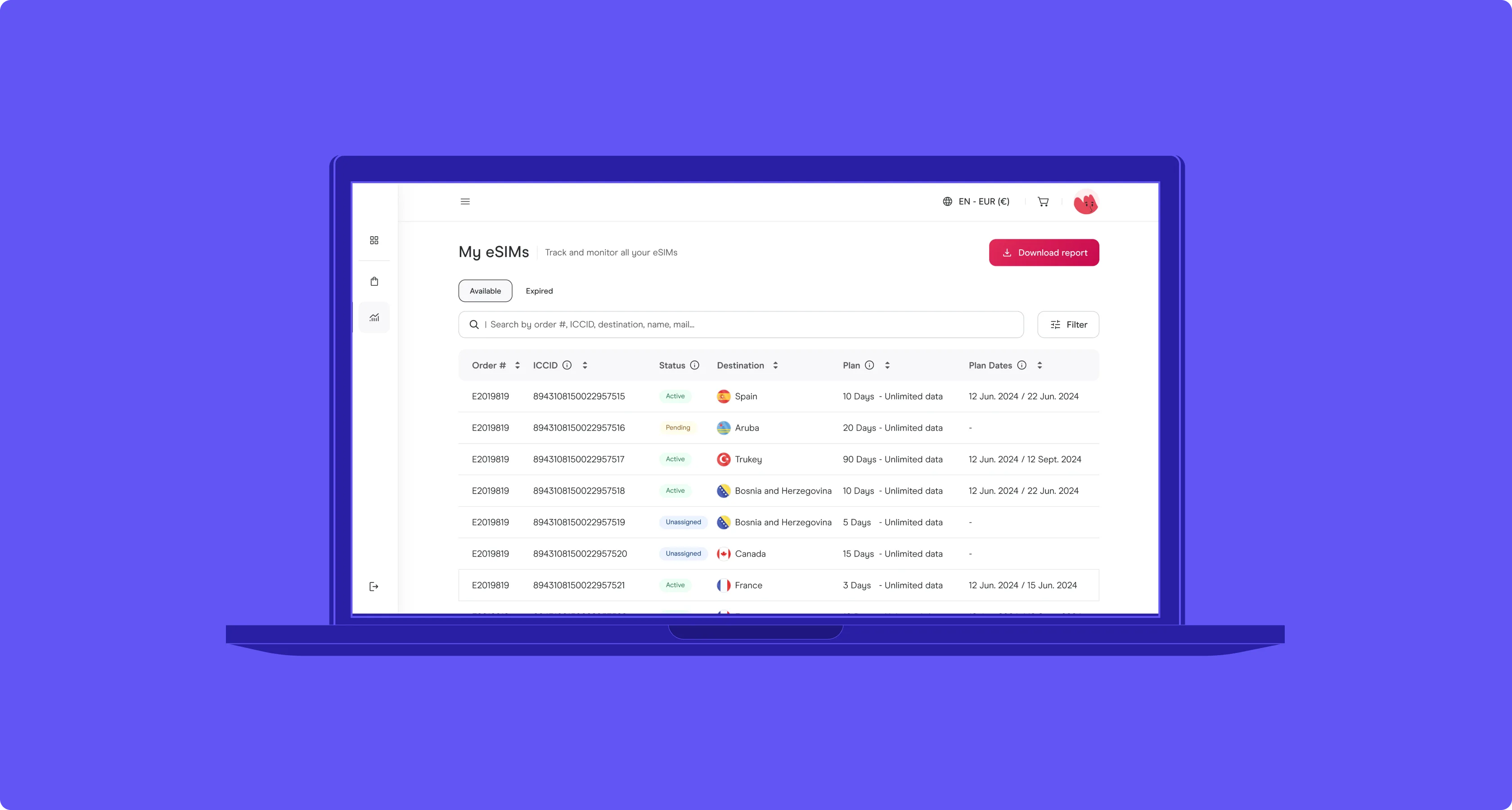
01 — The context
Enterprise clients were buying through consumer checkout. That's a revenue leak, not a UX issue.
A global eSIM provider had enterprise demand but no enterprise product. Corporate clients (airlines, automotive, banking) were buying through the consumer checkout: one purchase per employee, no budget controls, no consolidated invoicing, no visibility across teams.
The business cost of that gap was concrete. Finance teams couldn't reconcile expenses. IT departments couldn't enforce destination policies. Sales couldn't close deals with procurement departments that required role-based access, audit trails, and volume pricing in the contract. Every month without a B2B surface meant enterprise deals closing on handshake agreements and manual spreadsheets, or not closing at all.
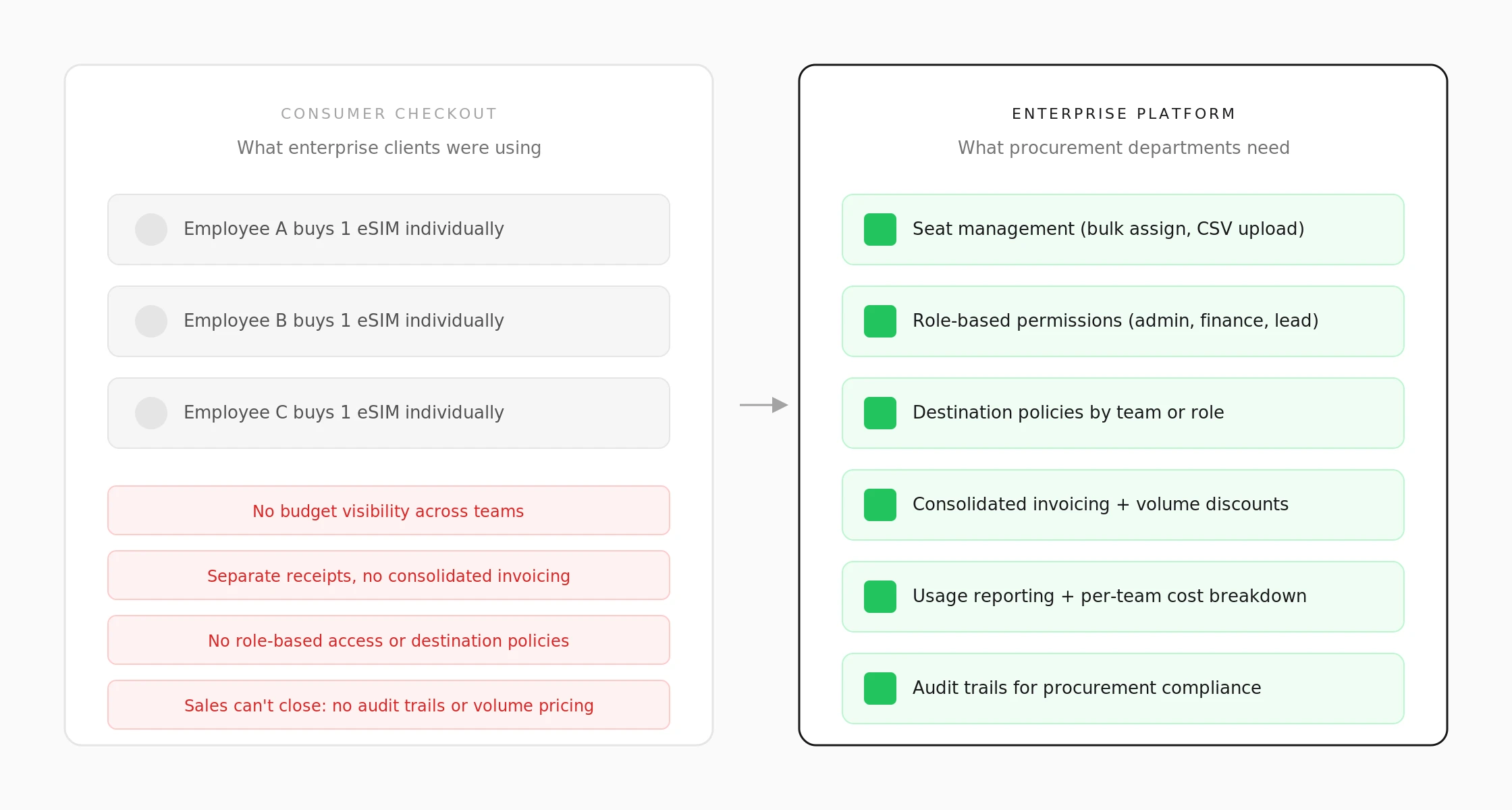
Left: how enterprise clients were buying (one purchase per employee, no controls). Right: what procurement departments actually need to close a deal.
02 — The problem
Three clients, three procurement models, one platform. The design problem is the data model.
The launch cohort included an airline, an automotive manufacturer, and a multinational bank. Each operated under a different procurement logic.
The airline billed centrally to a single HQ account. The automotive company uploaded CSVs of drivers by region and expected per-region invoicing. The bank assigned eSIMs by cost center with approval chains. The surface behavior was different in every case, but I needed to find what stayed constant underneath.
If I designed for the airline's model, the bank's workflow would break. If I built three separate flows, every new client would be a custom build from scratch. That's the trap in B2B platform design: you close deals by building one-offs, and then the product can't scale past the pilot.
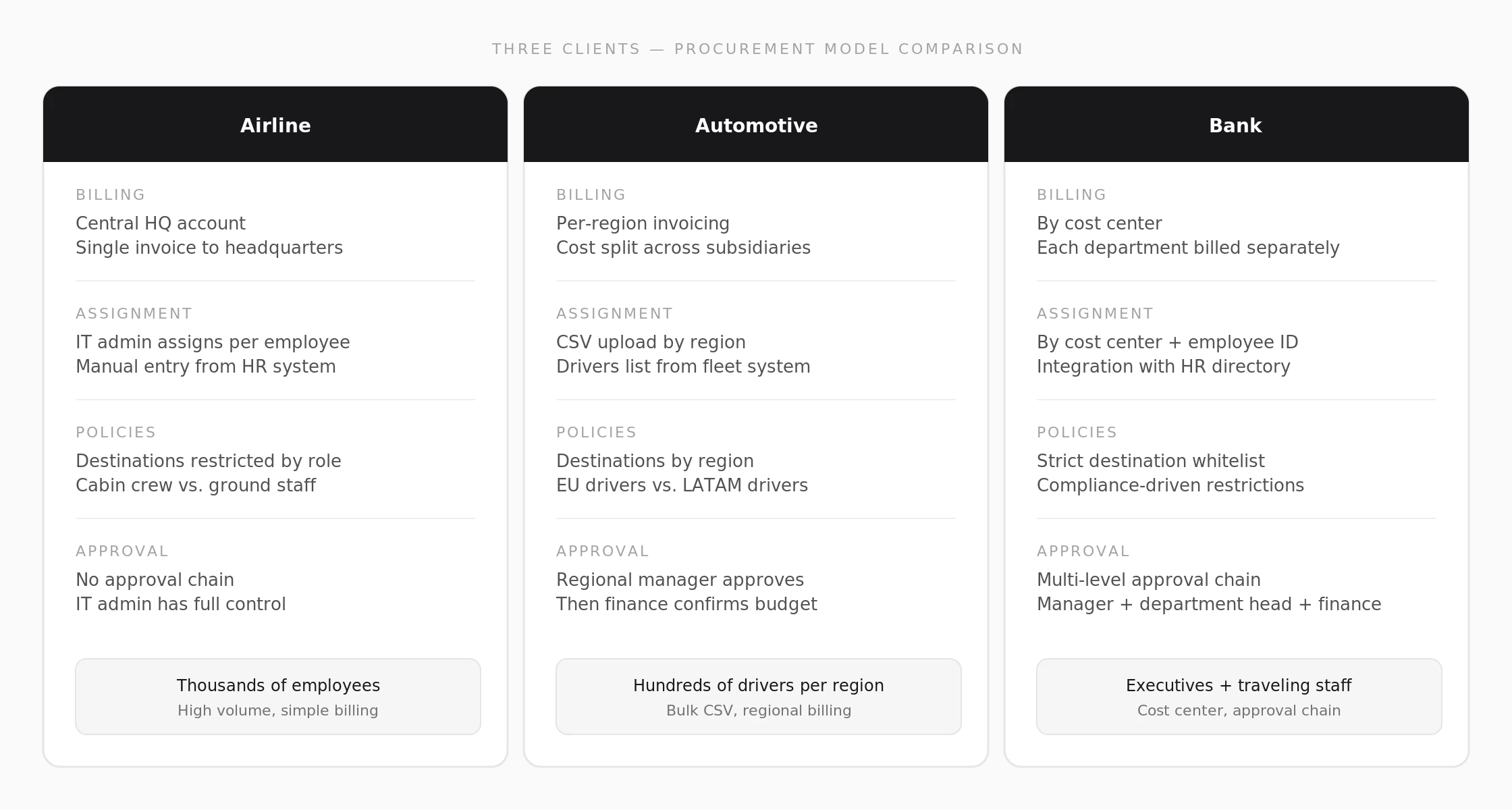
Three pilot clients, three procurement models. Same four dimensions (billing, assignment, policies, approval), completely different surface behavior.
03 — What I did
Technical discovery first. Figma second.
Stakeholder mapping and domain modeling (weeks 1-3). I ran working sessions with sales, finance, legal, and the backend lead. The goal wasn't gathering requirements. It was building a shared object model: what is a "plan," what is an "assignment," what is a "billing event." Each stakeholder used the same words to mean different things. Until we had a shared vocabulary, any wireframe I produced would encode the wrong assumptions.
Stakeholder mapping artifacts, weeks 1-3. Working sessions with sales, finance, legal, and backend to build the shared object model.
Identifying the invariant (week 3). Across all three clients, Plan, Assignment, and Billing were always independent concerns. The airline's billing model didn't affect how plans were assigned. The bank's approval chain didn't change the underlying plan structure. Once I had that separation, the design problem changed. I wasn't designing three admin panels. I was designing a configuration layer where the client's business model is a variable, not a fork.
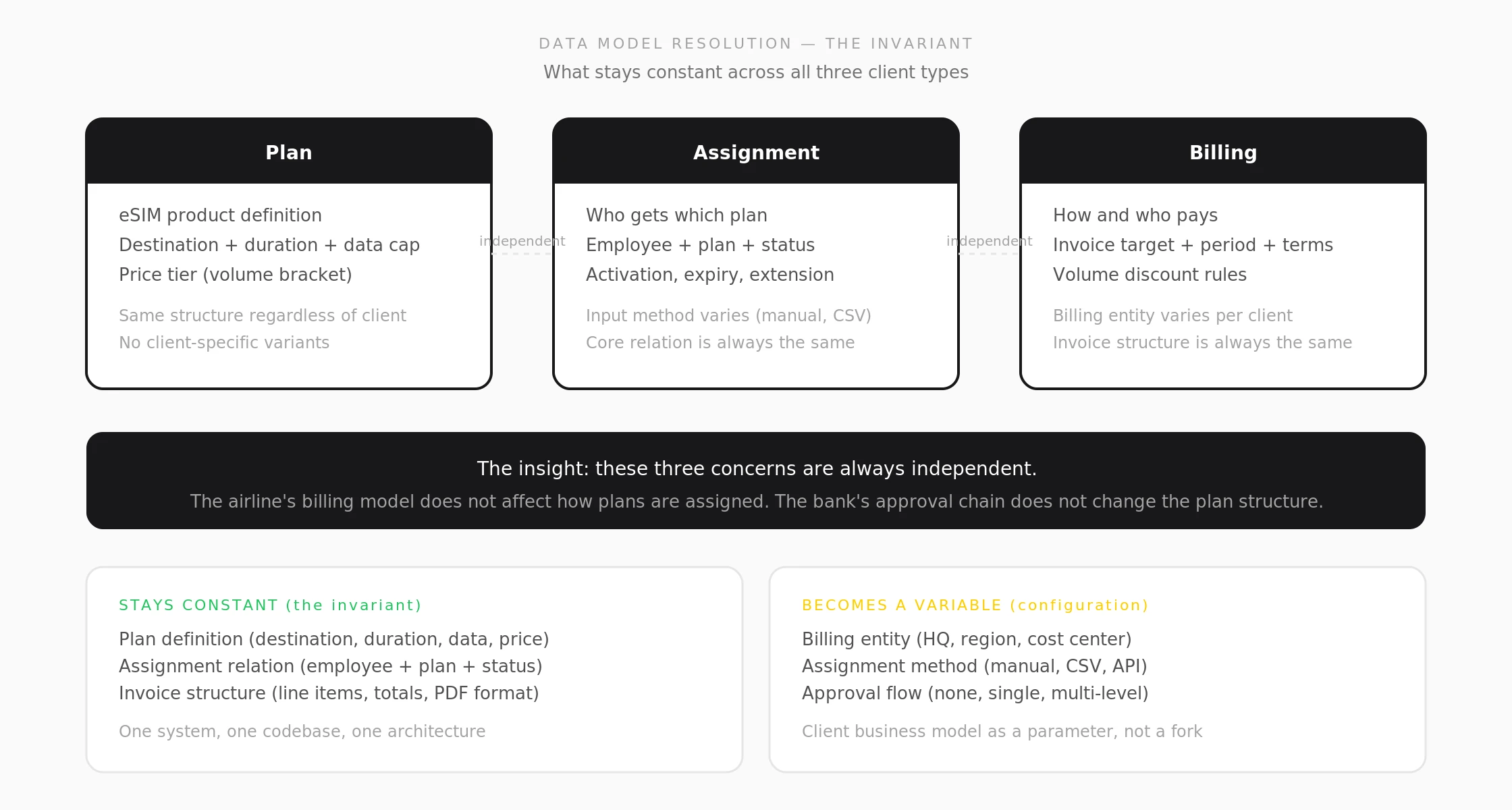
The invariant: Plan, Assignment, and Billing are always independent concerns. What stays constant becomes the architecture. What varies becomes configuration.
Wireframing from the data model (weeks 4-6). 14 wireframe variants in two days using Google Stitch to explore layout density and information hierarchy. Rounds one and two didn't hold because I was designing around what the client said they wanted rather than what the data model required. Round three held because it was anchored to the invariant.
Edge case specification (weeks 5-7). I used Claude to run adversarial QA against the wireframes: "what happens if the CSV has duplicate employee IDs," "what if a plan expires mid-assignment," "what if billing and provisioning disagree on status." Six edge cases surfaced. Four shipped in the error handling spec before development started.
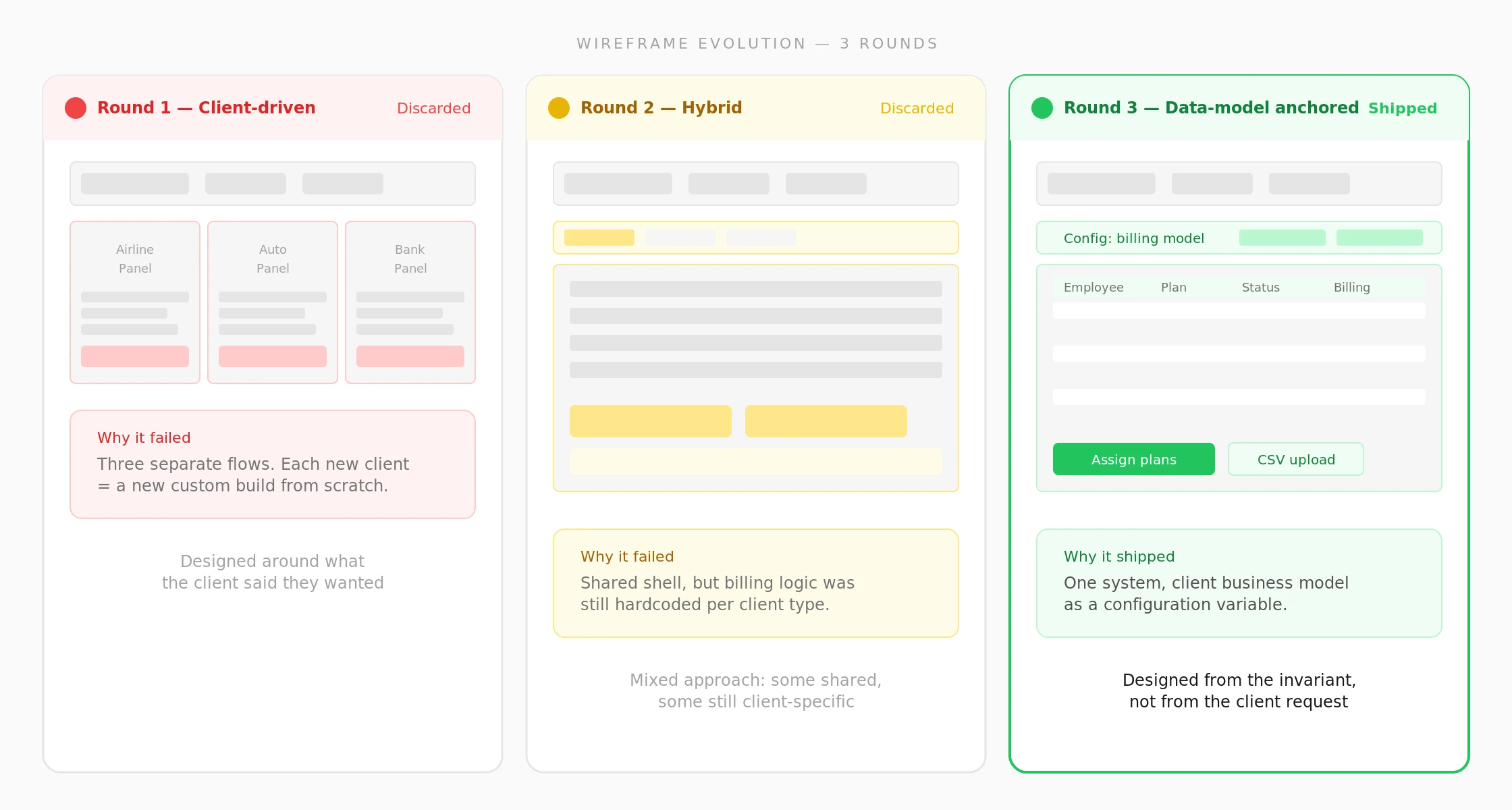
Three wireframe rounds. Rounds 1 and 2 failed because they were designed around client requests. Round 3 shipped because it was anchored to the data model invariant.
04 — Process artifacts
The Figma file tells the story. Object model on top, wireflows underneath.
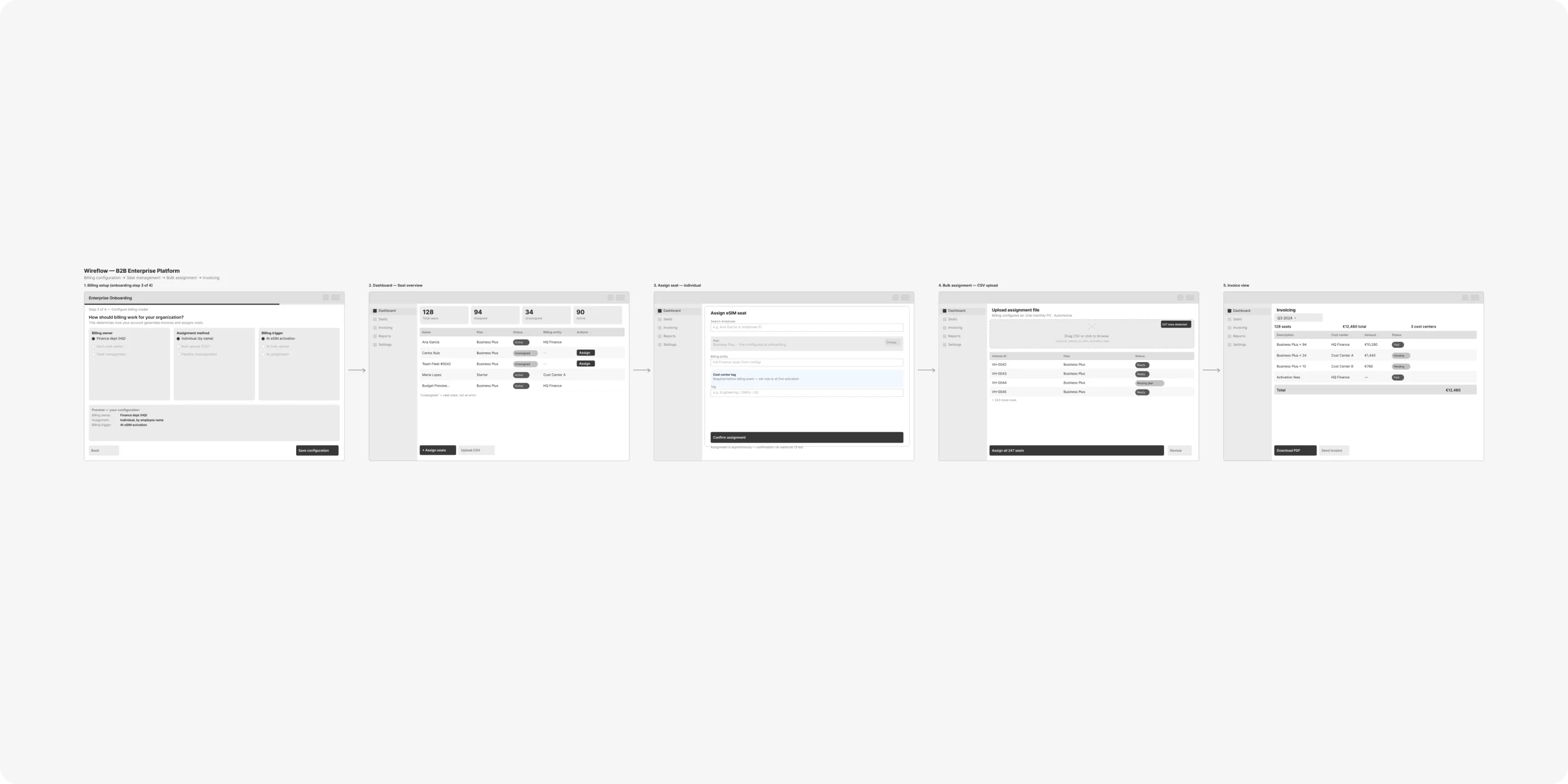
The process page in Figma starts with the one-pager: stakeholders, constraints, data model, and the three-client comparison table. Below that, the wireframe evolution across three rounds. At the bottom, the final wireflow showing five screens and how they connect.
I structure every project file this way. The one-pager sits at the top so anyone opening the Figma (PM, engineer, new designer) can read the problem space in under two minutes without a walkthrough.
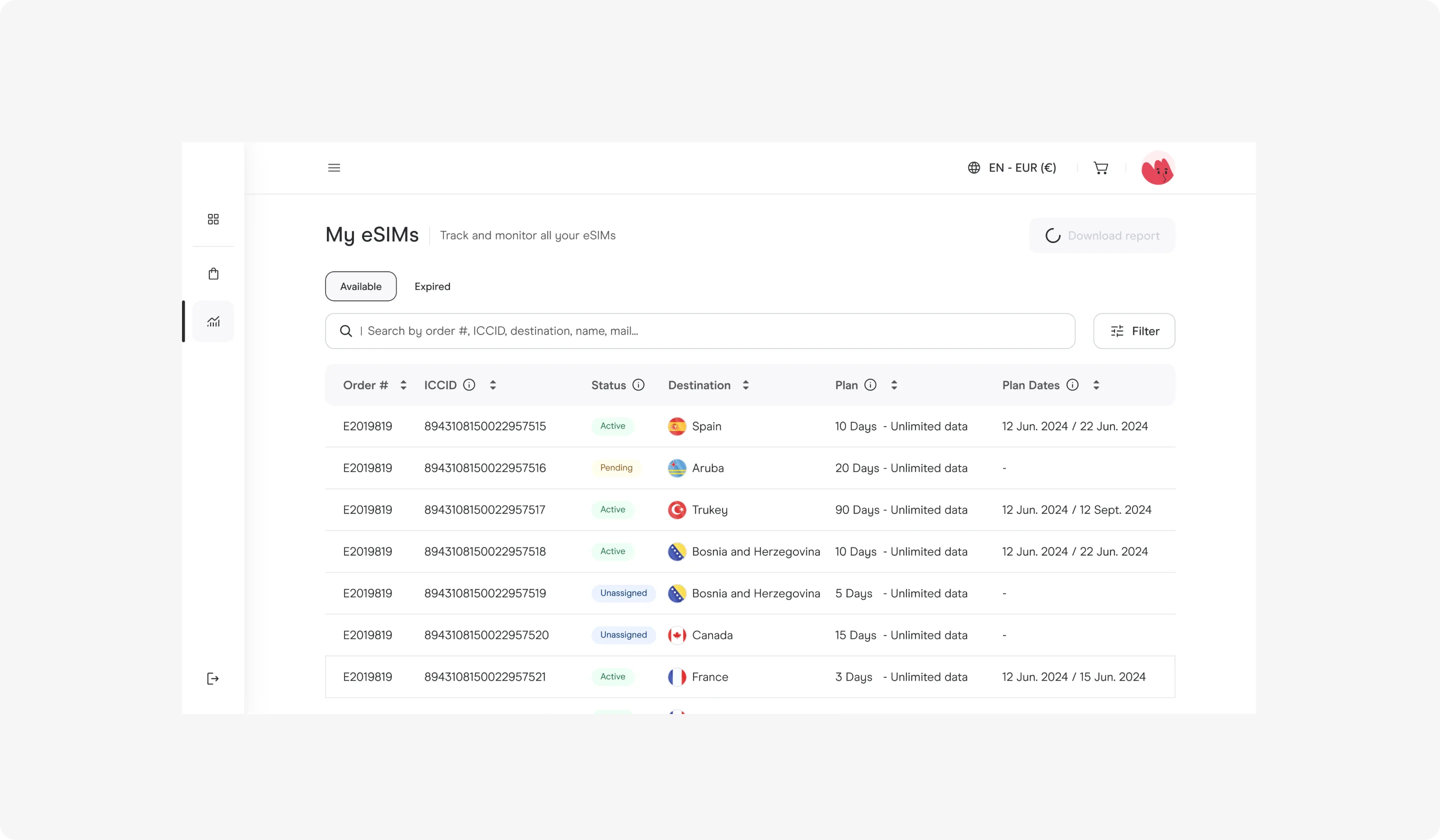
Figma process page. One-pager at the top, data model in the middle, wireframe rounds at the bottom. Anyone opening this file reads the problem space in two minutes.
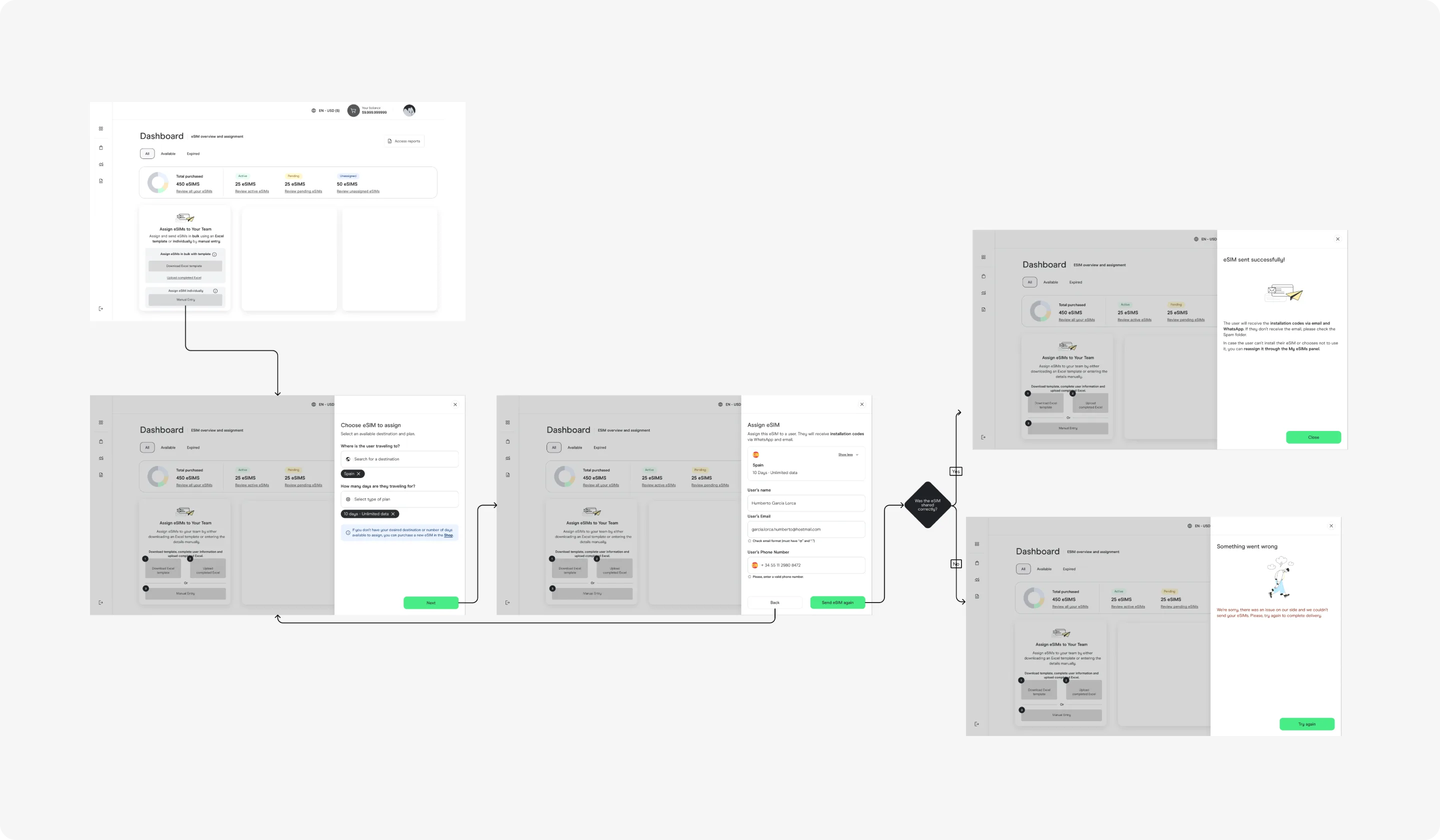
Final wireflow. Five screens, one system, three entry points depending on the client's procurement model.
05 — The solution
One platform. Three billing models. Zero custom builds.
The admin covers five core surfaces: billing model setup, team dashboard, individual assignment, bulk CSV upload, and invoice view. Those five screens aren't five features. They're one system with three entry points depending on the client's procurement model.
Bulk assignment accepts the CSV format IT departments already use. No data transformation, no new template. The design decision: absorb the client's existing workflow rather than imposing a new one. That reduced onboarding friction from "learn our tool" to "upload your spreadsheet."
Role-based access separates admin, finance, and team lead permissions. Finance sees billing and invoices. Team leads see their employees and usage. Admins configure everything. The permission model maps to how enterprise org charts already work, not to product-internal logic.
Consolidated billing renders volume discounts, per-team cost breakdowns, and one-page invoice PDFs. Finance teams didn't want dashboards with charts. They wanted numbers they could paste into their reconciliation spreadsheets. I designed for export, not for exploration.
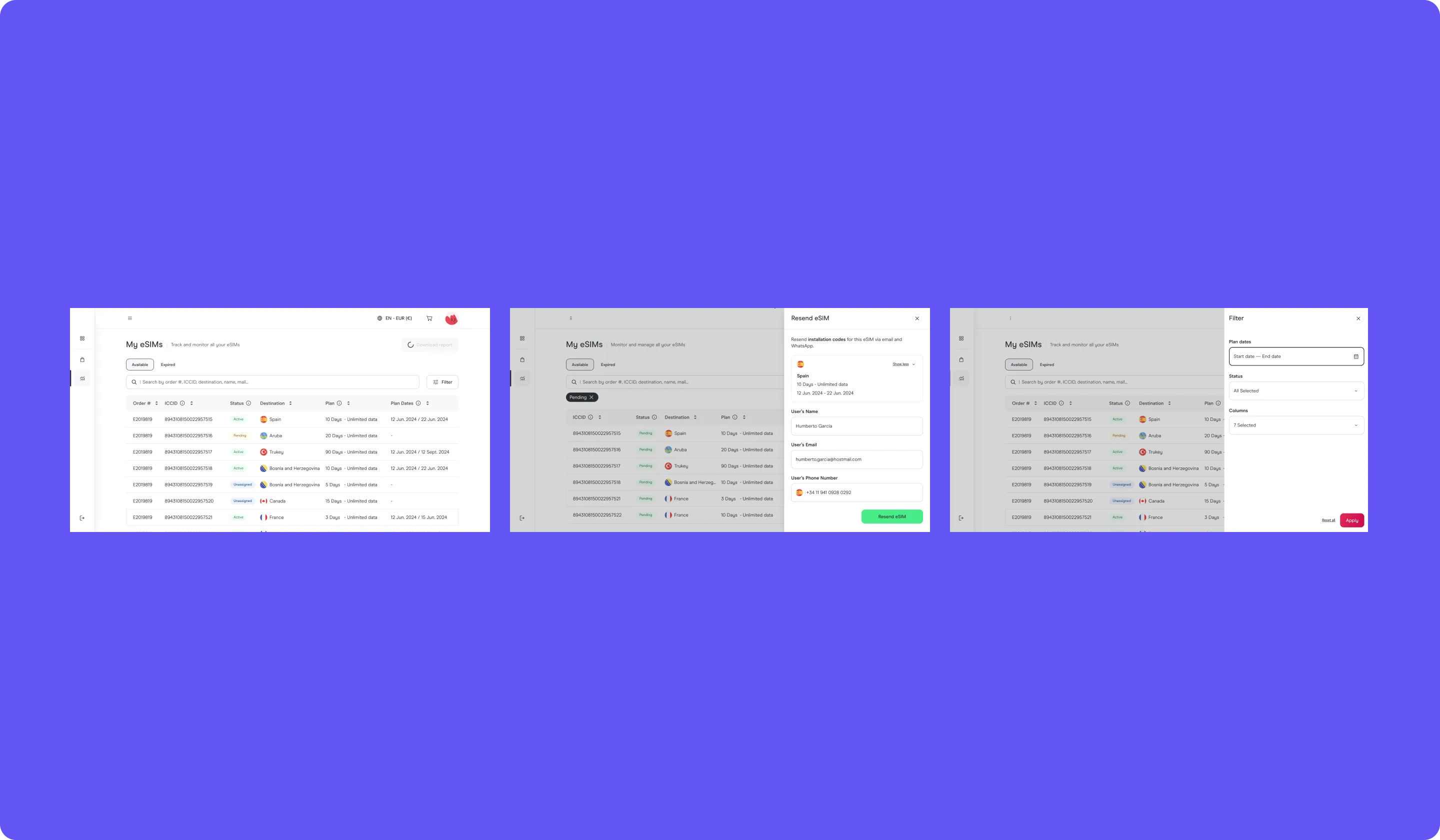
Shipped platform. Admin dashboard, bulk CSV assignment, role-based permissions, and consolidated billing in one interface.
06 — The result
From zero to 3,000+ enterprise clients on a single codebase.
The platform launched covering all three billing models in one codebase. The onboarding pattern for new clients became a configuration step, not a custom build. In the first year, the same architecture absorbed nine distinct billing configurations without a redesign.
Three numbers that mattered to the business: 3,000+ enterprise clients onboarded, 160+ destination markets served, and zero custom integrations required per client. That last number is the one I optimized for. Every custom integration is a maintenance cost that compounds quarterly.
07 — What I learned
In B2B, the design problem starts before Figma opens.
The admin surface worked because procurement, legal, and finance agreed on the object model before I designed any screen. The ratio was roughly 40% alignment, 60% UI. In my experience, reversing that ratio produces a product that looks polished but doesn't survive the first procurement review.
The other lesson: minimalism in B2B admin tools isn't an aesthetic preference. It's a cognitive load decision. These screens display billing state, provisioning status, and usage data simultaneously. Every element I removed was a reduction in the number of things a finance manager needs to parse at 4pm on invoice day. The visual simplicity is the strategy, not the outcome.
08 — Decisions not made
Three things I pushed back on, and the reasoning behind each.
No custom integrations per client. Custom integrations would have shortened onboarding for the first three clients and made the product unscalable for the next three hundred. I argued for a configuration-based architecture instead. The trade-off: slower initial setup, but every new client onboards without engineering involvement.
No self-service sign-up. Enterprise eSIM management requires contract negotiation, volume pricing, and legal review. A self-service flow would have created the illusion of product-led growth for a sales-assisted business. I designed the onboarding as a guided flow where sales configures the account and hands it to the client with permissions already set.
No real-time usage dashboard. The engineering cost of real-time data sync across three backend systems (provisioning, billing, partner inventory) was disproportionate to the user need. Daily batch processing covered 90% of reporting use cases. I documented the remaining 10% as a future phase with a clear trigger: "build real-time when a client's SLA requires sub-hour reporting."