

Plans Lifecycle
From 'buy a plan' to a complete self-service lifecycle, onboarding, management, cancellation, reactivation, and phone activation.
Role
End-to-end UX and UI design for the full Plans lifecycle
Platform
Mobile + Web
Constraints
4 constraints
Goal
Design a complete self-service lifecycle, from onboarding through cancellation, that reduced CX contact dependency for plan management
Problem
Customer support contact volume for plan-related queries was a direct signal that the self-service experience wasn't working. Users couldn't manage their plan without help.
Key Insights
Users who couldn't find the cancellation option assumed they'd be charged indefinitely, friction in cancellation wasn't reducing churn, it was destroying trust.
The phone number activation feature had very low uptake not because users didn't want it, but because there was no clear entry point from the plan management context.
Proactive status communication (renewal reminders, usage alerts) was expected but entirely absent, users were left to check manually.
Process
Wireframes
Used Google Stitch for rapid wireframing across all four flows: onboarding, management dashboard, cancellation, and phone number activation. Each flow was designed to hand off cleanly to the next lifecycle stage.
User Flows
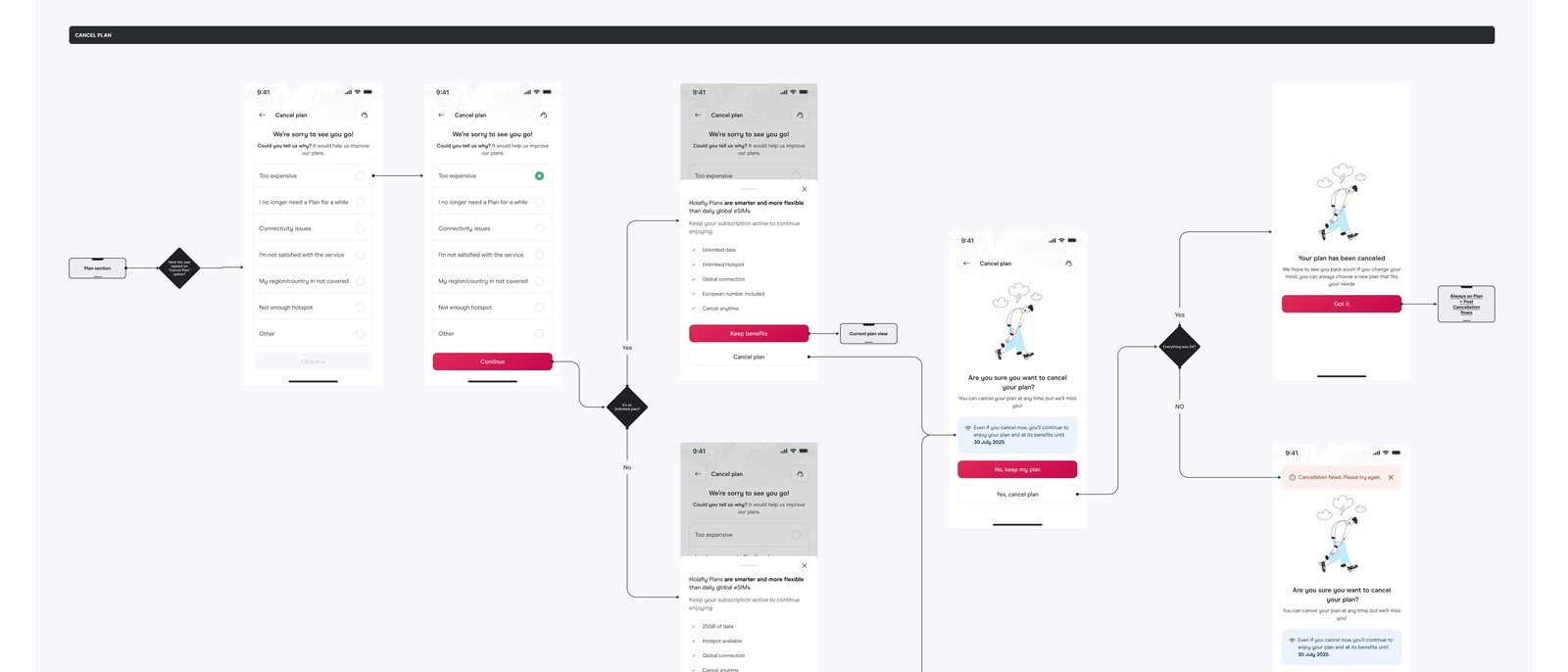
Designed explicit lifecycle handoffs: purchase confirmation → dashboard → management actions → cancellation or upgrade → reactivation prompt (7 days post-cancel). Phone number activation surfaced as a persistent banner for eligible users.
Iterations
Used Gemini for a heuristic pass specifically on the cancellation flow, checking for dark patterns and ensuring the experience was genuinely cancellation-friendly, not artificially obstructive. Iterated to remove a confirmation step that added friction without reducing errors.
Process / Wireframes
Solution
Four connected flows sharing consistent patterns: lightweight onboarding for new plan users, a single management dashboard with status and lifecycle actions, a 3-step cancellation flow with reactivation prompt, and phone number activation as a first-class dashboard action for Unlimited users.
Final UI / Solution
Management dashboard
plan status, renewal date, data usage, and lifecycle actions in one view
3-step cancellation
reason capture → impact summary → confirmation, no chat redirect
Reactivation prompt sent in-app 7 days after cancellation
Phone number activation surfaced as persistent dashboard banner for eligible users
Outcomes
purchase → manage → cancel → reactivate → activate number
Lifecycle Stages Unified
previously CX-only
Cancellation Path
promoted from buried setting
Phone Activation
The Plans lifecycle UX consolidated all plan management into a self-service experience, reducing CX contact dependency for routine plan queries.
Learnings
What worked
The lifecycle mapping exercise, specifically visualizing the handoffs between stages, made it clear where users were hitting dead ends and where the re-engagement opportunities were.
Designing transparent cancellation (rather than optimizing for friction) was the right call: a cancellation flow that respects the user's decision builds more long-term trust than one that obstructs it.
What I'd improve
Proactive notifications tied to plan lifecycle events (renewal reminders, low-data alerts, expiration warnings), these were scoped to v2
Formal A/B testing for the cancellation flow to understand what reason-capture questions actually reduce churn vs. which ones just add friction